 Long ChatGPT Conversations
ChatGPT Outline for Long Conversations
Long ChatGPT chats turn into a wall of scrolling. Long ChatGPT Conversations adds a live outline panel that maps every prompt and answer, so you can jump to any section in one click.
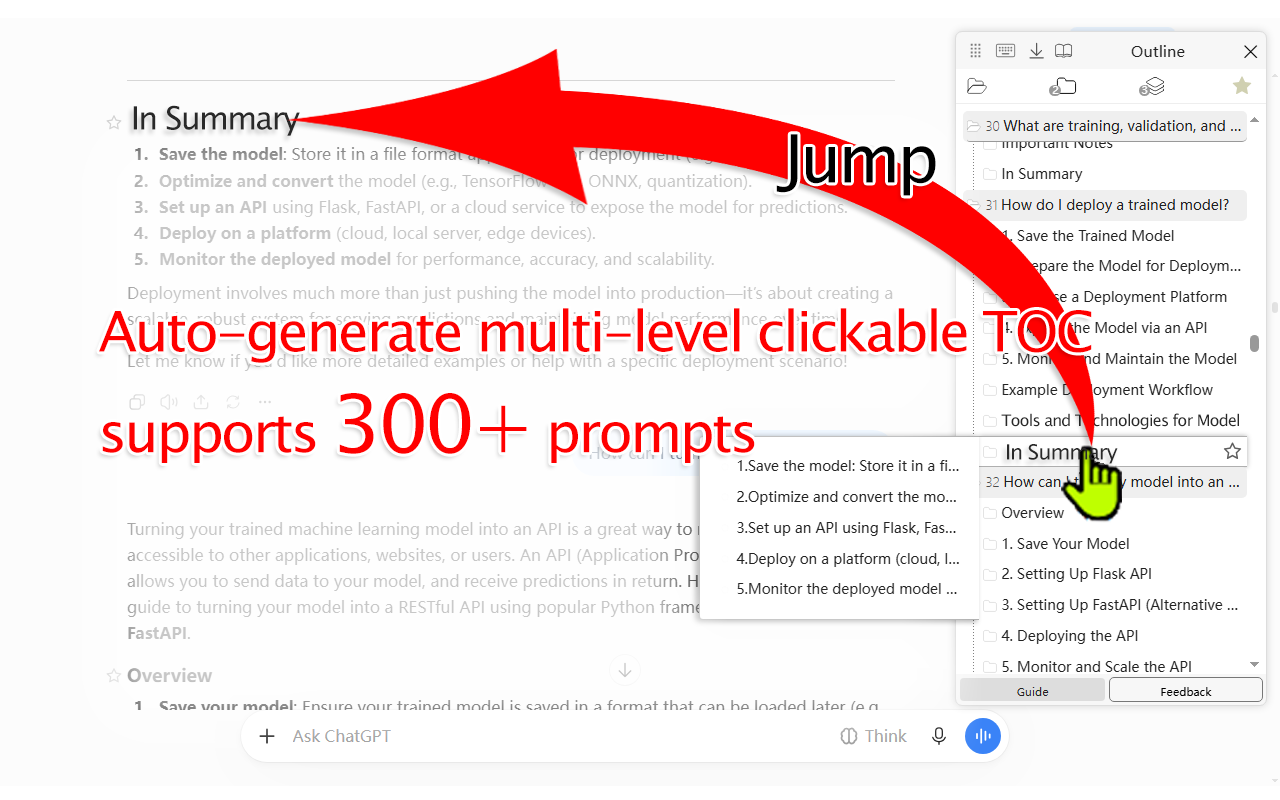
How it works
Install the extension
Add Long ChatGPT Conversations from the Chrome Web Store.
Open a long chat
The outline panel appears on chatgpt.com and maps the conversation.
Click to jump
Click any node to move straight to that message, no scrolling.
Why it works for long chats
A real outline, not just search
ChatGPT's built-in search finds words. An outline shows structure: your prompts on top, and the headings, steps and lists inside each answer underneath. You see the whole conversation at a glance.
Built for 300+ message chats
The panel updates as replies stream in, follows the section you are reading, and automatically loads older messages when you jump back to them.
Bookmarks and export, not just navigation
Star the answers that matter, tag them, and filter to bookmarks only. When you are done, export selected turns to Markdown, PDF, HTML, JSON or EPUB.
FAQ
Is there a free ChatGPT outline extension?
Yes. The open-source edition is free, MIT-licensed and runs locally with no account. The official Chrome Web Store release adds cloud sync, tags and more export formats.
Does it work with very long conversations?
Yes — it is designed for 300+ message chats. Older messages are loaded automatically when you jump to them.
Does it read or upload my conversations?
The open-source edition makes no network requests and stores everything in chrome.storage.local. Nothing leaves your browser.
Which chat sites are supported?
ChatGPT is the main focus and has the most complete support. Other chat sites are also supported.
Turn your long ChatGPT chat into a clickable outline
Try the free open-source edition, or get cloud sync, tags and more export formats in the official release.