 Long ChatGPT Conversations
Export ChatGPT Conversations
Need to keep, share or archive part of a long ChatGPT chat? Select the turns you want and export them in a format that preserves the structure.
How it works
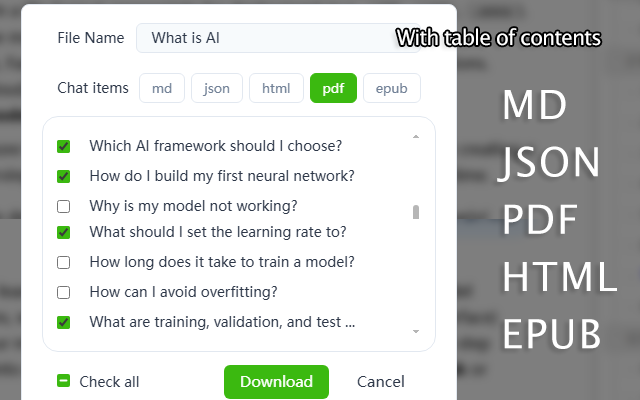
Open the export dialog
Click the export button in the panel header.
Select the turns
Tick the messages you want to include.
Choose a format and save
Pick Markdown, JSON, HTML, PDF or EPUB and save the file locally.
Why it works for long chats
Markdown for notes and docs
Export clean Markdown that keeps headings, lists, tables and code blocks, ready to paste into Notion, Obsidian or a repo.
PDF with a clickable table of contents
The official release can generate a PDF with a clickable table of contents, so long exports stay navigable.
Everything stays local
Export runs in your browser. Your conversation is not uploaded to a server.
FAQ
How do I export a ChatGPT conversation to Markdown?
Open the export dialog, tick the turns you want, choose Markdown, and save the file. The file is generated locally.
Can I export to PDF with a table of contents?
Yes — the official release generates a PDF with a clickable table of contents.
Is my conversation uploaded during export?
No. Export runs in your browser; nothing is uploaded.
Are tables and code blocks preserved?
Yes, where the target format supports them. Markdown, HTML and PDF preserve the most structure.
Turn your long ChatGPT chat into a clickable outline
Try the free open-source edition, or get cloud sync, tags and more export formats in the official release.