 Long ChatGPT Conversations
Why Markdown instead of copy-paste
Copying from the chat page loses structure. Markdown keeps headings and lists, which is what makes a long answer reusable later.
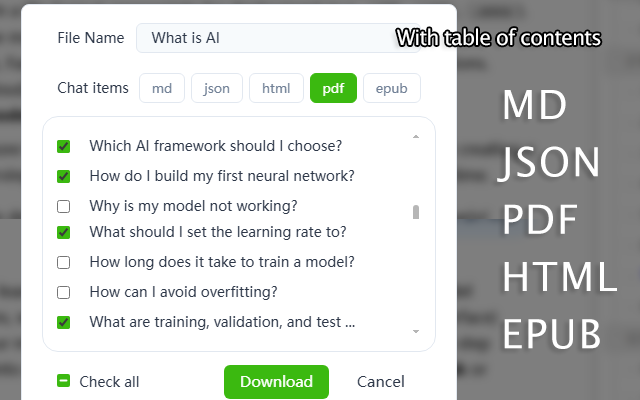
Export only the useful turns
A whole thread is usually too noisy for notes. Select the answers that matter and leave the rest in ChatGPT.
PDF when you need a fixed document
If the destination needs a shareable file rather than editable text, export a PDF instead. The official release adds a clickable table of contents.
How to do it
- Export Markdown: Open the export dialog, select the turns, and choose Markdown.
- Open your notes app: In Notion, create a page and paste; in Obsidian, drop the .md file into your vault.
- Keep the structure: Headings, lists, tables and code blocks stay readable because they are standard Markdown.
FAQ
Can I import a ChatGPT conversation into Notion?
Yes. Export the turns as Markdown, then paste into a Notion page. Notion converts standard Markdown headings, lists and code blocks.
How do I get a ChatGPT chat into Obsidian?
Export Markdown and place the .md file in your vault, or paste it into a new note.
Is my conversation uploaded when exporting?
No. Export runs in your browser; nothing is uploaded.